Documentation Index
Fetch the complete documentation index at: https://docs.openai-nebula.com/llms.txt
Use this file to discover all available pages before exploring further.
1. Overview
OpenCode is an open-source AI coding assistant supporting 75+ models and local deployment. With Nebula Api, you can use mainstream and latest models (e.g. GPT, Claude, Gemini) in OpenCode and configure custom providers and models.
Download: https://opencode.ai/
2. Quick setup (Nebula Api)
2.1 Get an API key
Create and copy your API key from the Nebula Api console.
- Open OpenCode and go to Server / Provider settings.
- Add a custom provider (Configure an OpenAI compatible provider).
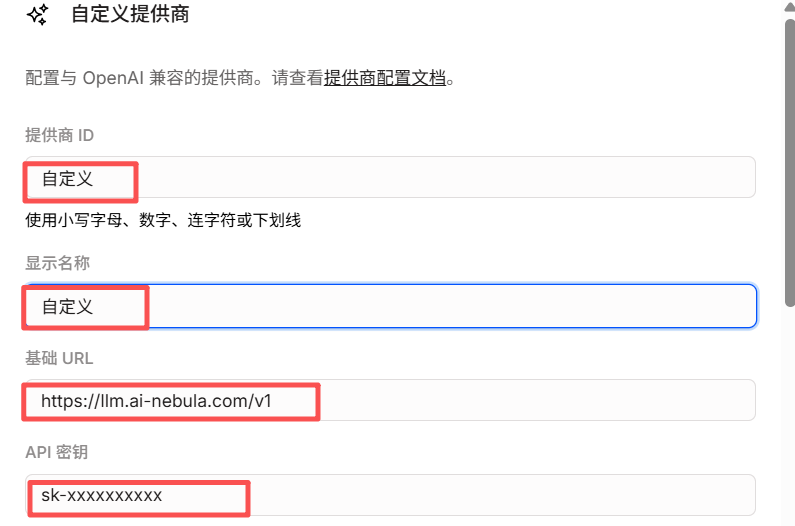
- Fill in:
- Provider ID: e.g.
nebula (lowercase, digits, hyphens or underscores)
- Display name: e.g.
Nebula Api
- Base URL:
https://llm.ai-nebula.com/v1 (must end with /v1)
- API key: paste your Nebula Api key
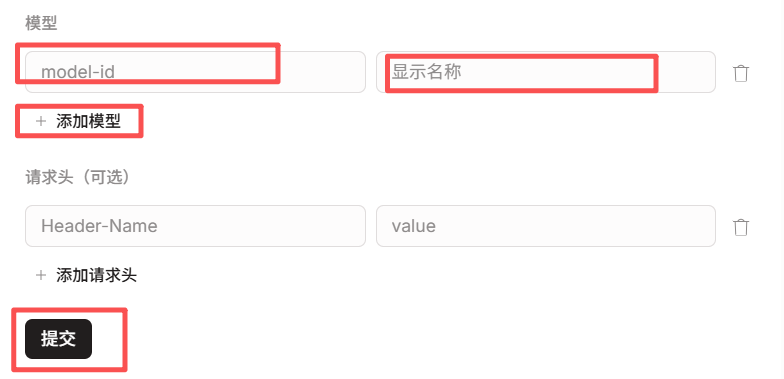
- Under Models, add the models you need (e.g.
gpt-4o, claude-sonnet-4-20250514). Model IDs must match the Nebula model list.
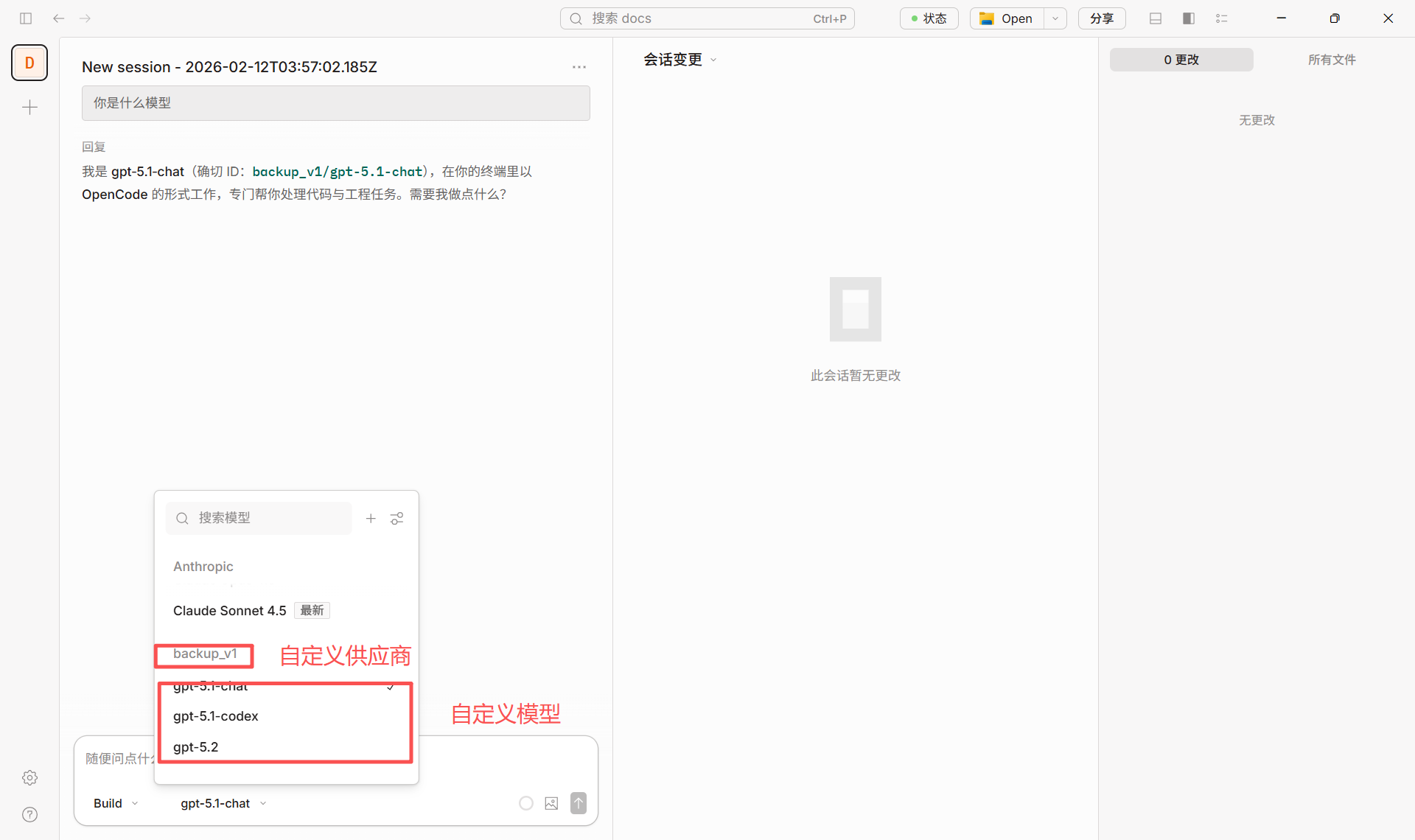
- After saving, use providerID/modelID in the model selector (e.g.
nebula/gpt-4o).
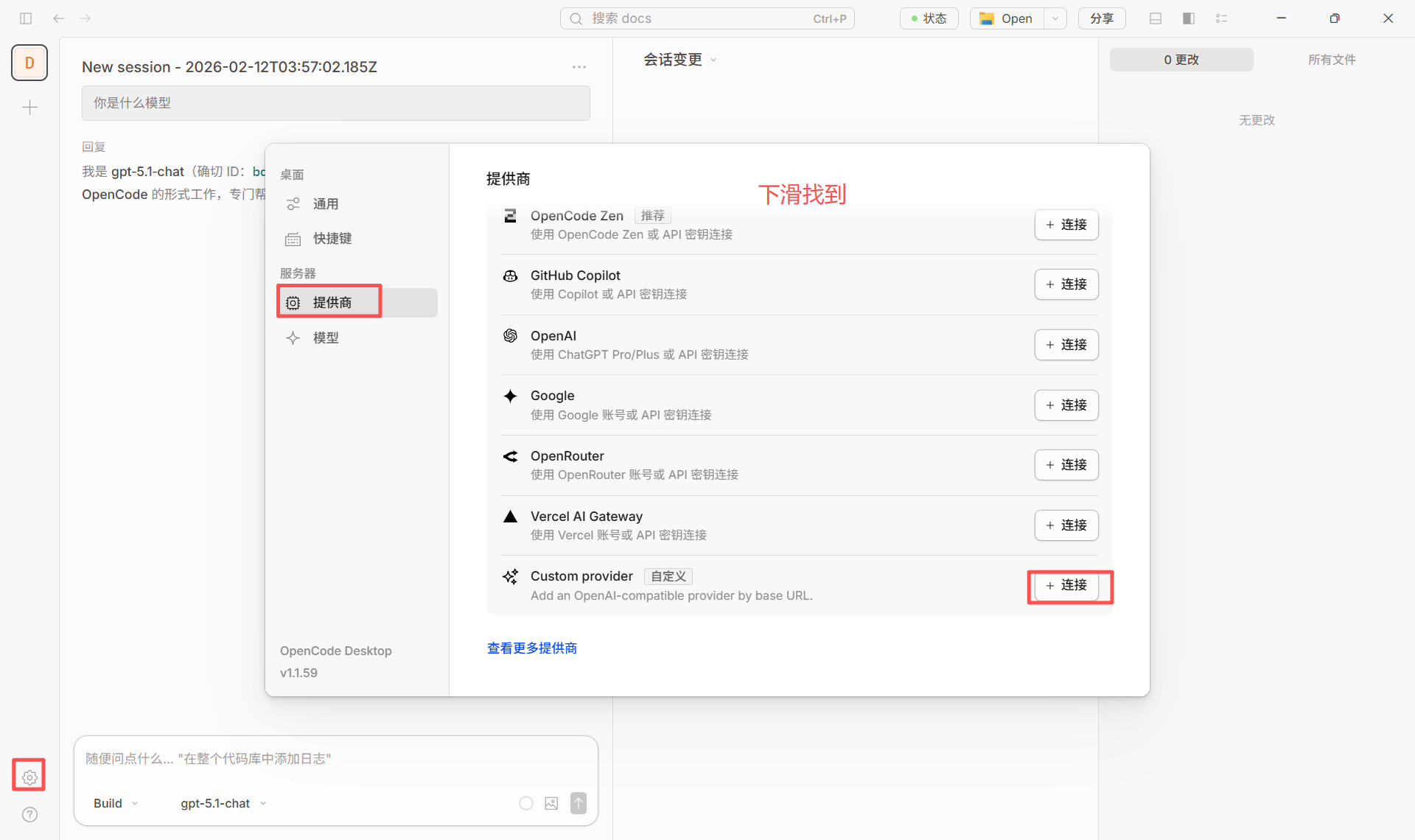 Configuration reference (matching the screenshots above):
2.3 Switching models
In the chat or settings, select the configured provider and model (e.g. nebula/gpt-4o) to switch.
- For self-hosted or backup Nebula, set Base URL to that address, e.g.
http://your-server:3003/v1.
- Default model can be set in project or global
opencode.json with "model": "nebula/modelID".
3. Some models require the Responses API (important)
Some models use a different API than standard Chat Completions and require the Responses API. If you see an error like this when using such a model in OpenCode:
Some Azure / OpenAI models only support the Responses API and do not support the traditional Chat Completions endpoint. Example error:
The chatCompletion operation does not work with the specified model, gpt-5.1-codex. Please choose different model and try again.
The screenshot below shows how this error appears in the UI:
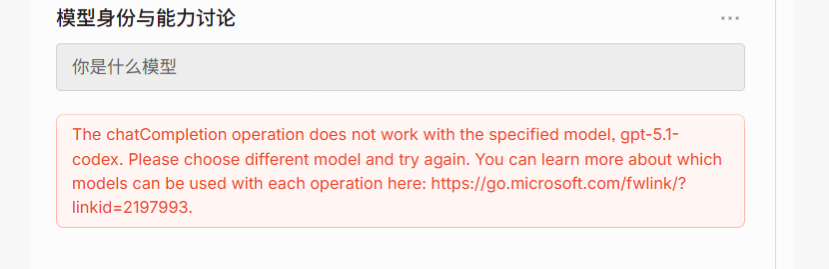 This means the request was sent as Chat Completions while the model only exposes Responses API on the server. You need to configure OpenCode to use the correct API.
3.1 Models that require the Responses API (typical)
| Model ID / family | Notes |
|---|
| gpt-5.1-codex | GPT 5.1 Codex, coding; Responses API only |
| gpt-5.2-codex | GPT 5.2 Codex, same as above |
| o3 / o3-pro | Reasoning models; some deployments only offer Responses API |
| o4-mini and other o4 | Same; check deployment and vendor docs |
| computer-use-preview | Experimental model used with Responses API computer-use tools |
apiCompatibility parameter for that model in the config file. No code changes are required.
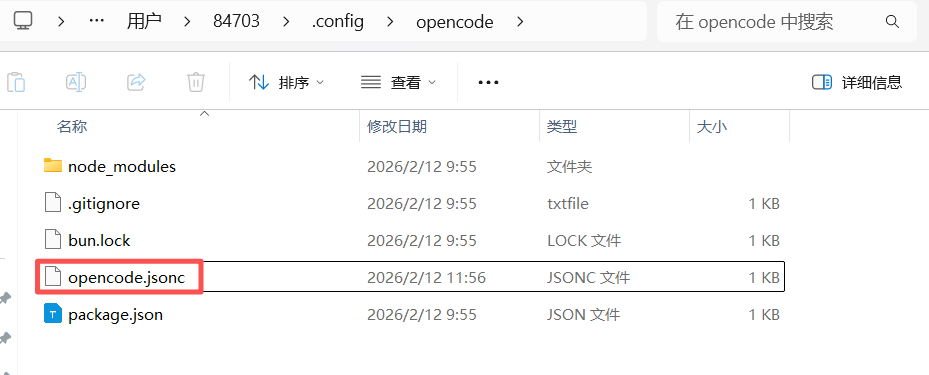
1. Locate the config file
- Windows:
C:\Users\<username>\.config\opencode\opencode.jsonc
- macOS / Linux:
~/.config/opencode/opencode.jsonc
You can also use opencode.json or opencode.jsonc in your project directory.
2. Add the parameter to the model config under your custom provider
In your existing provider (e.g. custom provider pointing to Nebula or your own API), add "apiCompatibility": "responses" for models that need the Responses API (e.g. gpt-5.1-codex). Example:
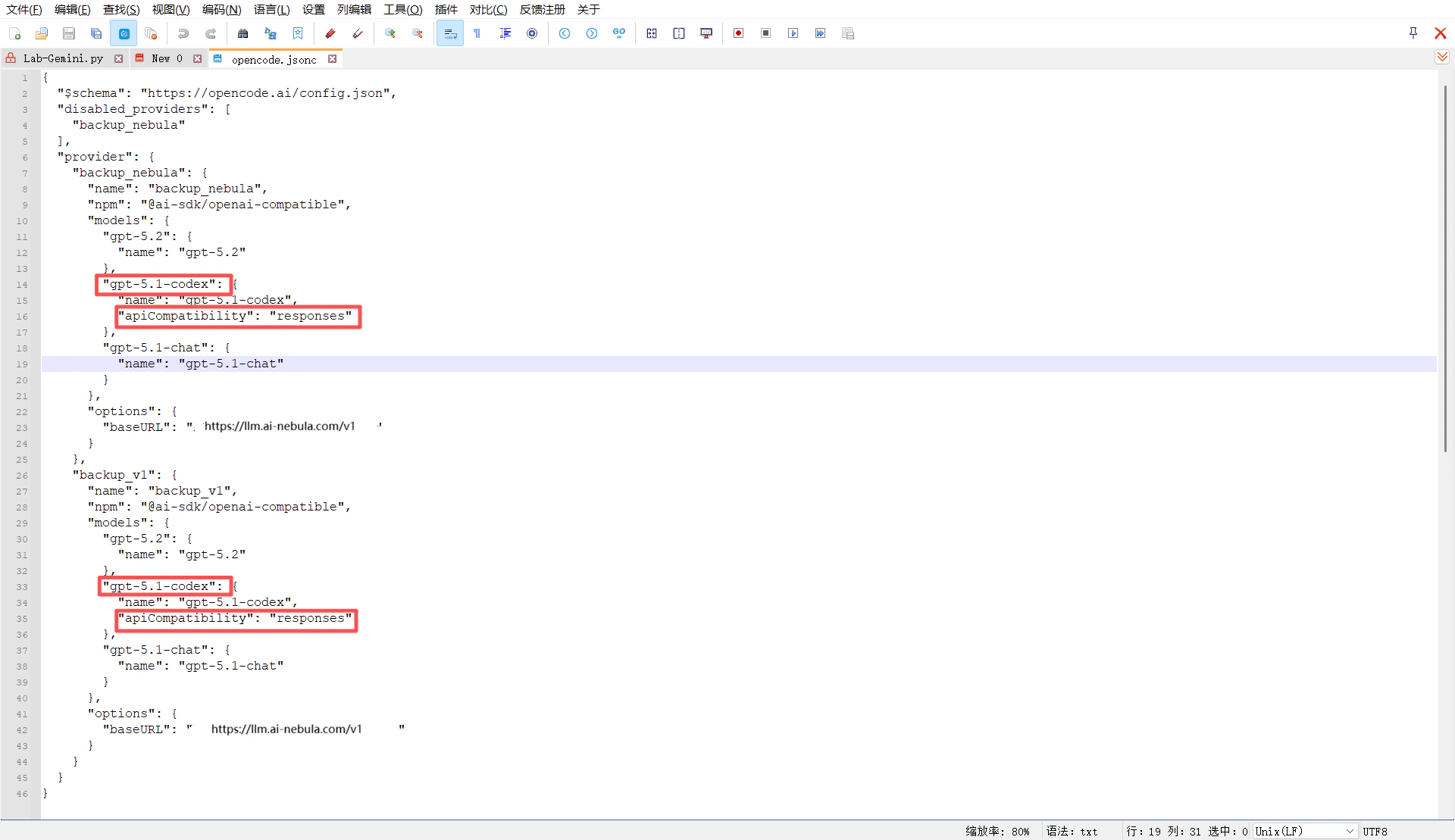
{
  "$schema": "https://opencode.ai/config.json",
  "disabled_providers": [
    "backup_nebula"
  ],
  "provider": {
    "backup_nebula": {
      "name": "backup_nebula",
      "npm": "@ai-sdk/openai-compatible",
      "models": {
        "gpt-5.2": {
          "name": "gpt-5.2"
        },
        "gpt-5.1-codex": {
          "name": "gpt-5.1-codex",
          "apiCompatibility": "responses"
        },
        "gpt-5.1-chat": {
          "name": "gpt-5.1-chat"
        }
      },
      "options": {
        "baseURL": "xxxxxxxx"
      }
    },
    "backup_v1": {
      "name": "backup_v1",
      "npm": "@ai-sdk/openai-compatible",
      "models": {
        "gpt-5.2": {
          "name": "gpt-5.2"
        },
        "gpt-5.1-codex": {
          "name": "gpt-5.1-codex",
          "apiCompatibility": "responses"
        },
        "gpt-5.1-chat": {
          "name": "gpt-5.1-chat"
        }
      },
      "options": {
        "baseURL": "https://llm.ai-nebula.com/v1"
      }
    }
  }
}
gpt-5.1-codex in OpenCode (e.g. backup_nebula/gpt-5.1-codex), requests will be sent to that baseURL in Responses API format.
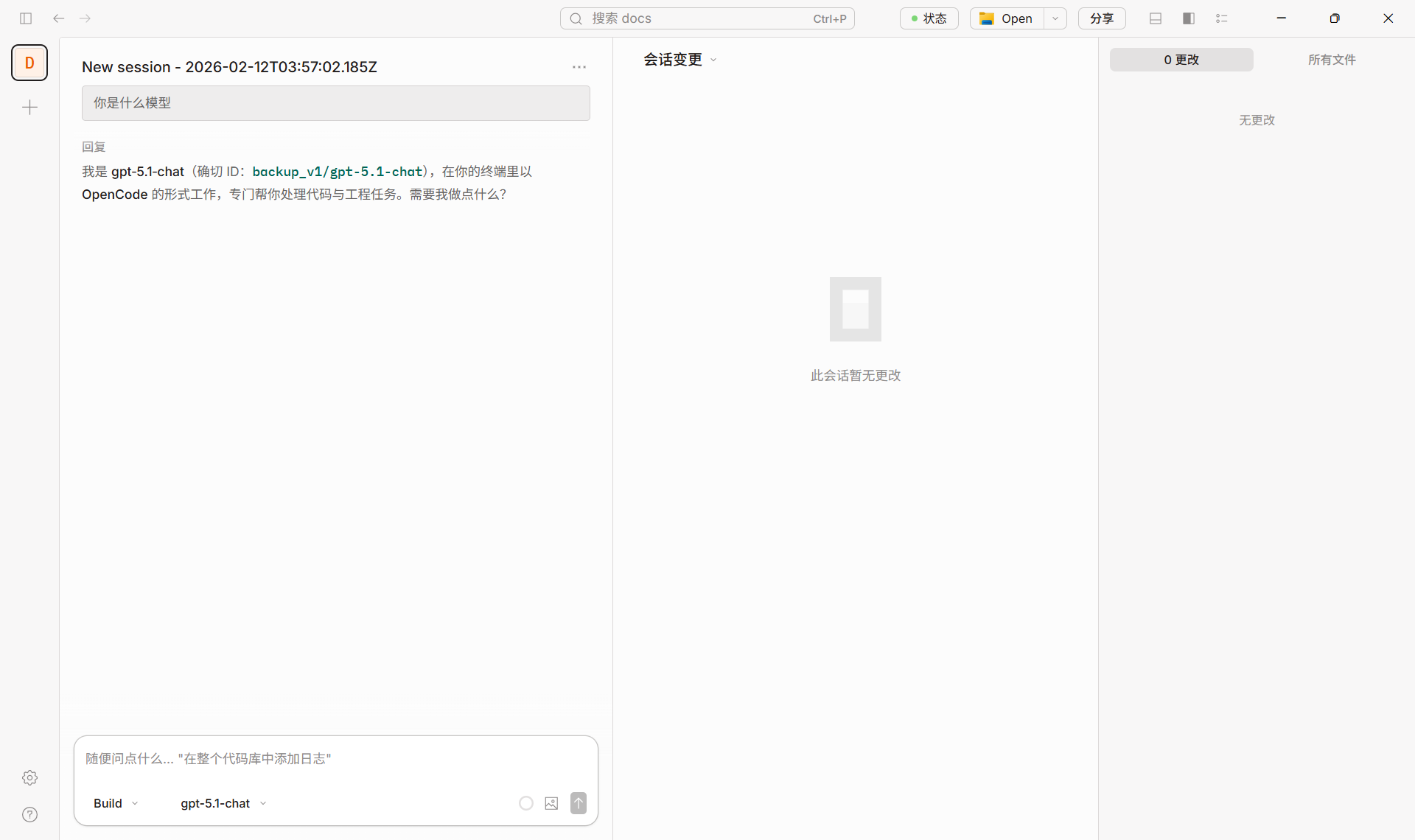
3. Success example
The screenshot below shows a normal chat in OpenCode using a correctly configured model (e.g. backup_v1/gpt-5.1-chat).
3.3 Summary
| Scenario | What to do |
|---|
| Models that only support Responses (e.g. gpt-5.1-codex, gpt-5.2-codex) | In opencode.jsonc, under the custom provider’s models, add "apiCompatibility": "responses" for that model (see config example and screenshots above). |
| Regular models (e.g. gpt-4o, claude-sonnet) | No apiCompatibility needed; use Nebula or a custom provider as in “Quick setup” above. |
4. Recommended models (via Nebula)
| Category | Model ID examples | Notes |
|---|
| Coding / Codex | gpt-5.1-codex | Ensure Responses API (see Section 3) |
| General chat / coding | gpt-5.2, gpt-5.1-chat | Use as-is; no Responses config |
| Long context / general | claude-sonnet-4-20250514, claude-sonnet-4-5 | Same |
| Cost-effective | gpt-4.1-mini, gemini-2.5-flash | Same |
Success example
The screenshot below shows a normal chat in OpenCode using Nebula Api.
5. References
